Why need to use?
@suspensive/react simplifies working with React Suspense and error boundaries by providing powerful, declarative components that solve common challenges in modern React applications. Here’s why you should use it:
Key Benefits
🎯 Simplified Error Handling
Handle errors declaratively with a clean, intuitive API that’s simpler than alternatives while being more powerful.
⚡ Better Suspense Control
Fine-tune loading states with timing controls, SSR support, and default props management across your entire application.
🔄 Coordinated Error Management
Easily reset multiple error boundaries at once without prop drilling or complex state management.
🎨 Improved Developer Experience
Write less boilerplate code while maintaining type safety and declarative patterns.
Common Problems @suspensive/react Solves
Problem 1: React Suspense in Server-Side Rendering
The Challenge: When using React Suspense in SSR environments like Next.js, you often encounter hydration errors because Suspense behavior differs between server and client.
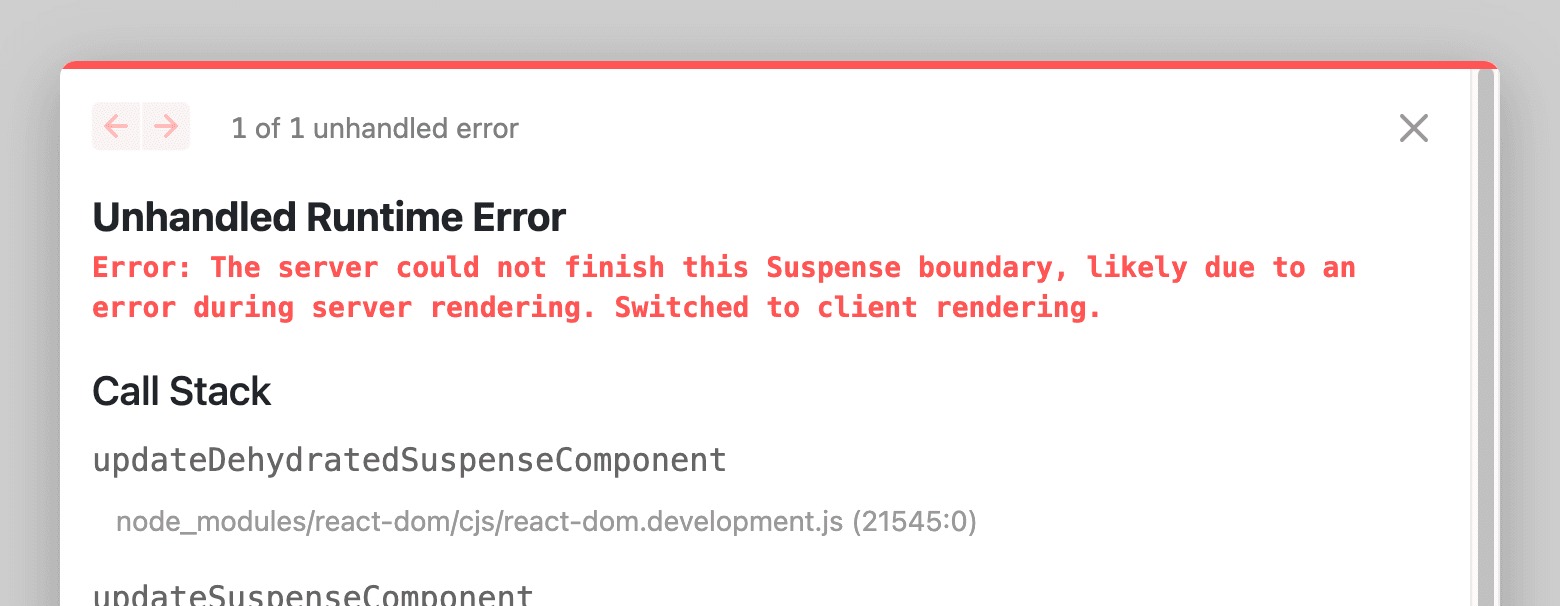
The Solution: Use <Suspense clientOnly/> to safely handle SSR/CSR differences.
Without @suspensive/react
// ❌ Problematic: May cause SSR errors
import { Suspense } from 'react'

function MyComponent() {
  return (
    <Suspense fallback={<Loading />}>
      <ClientOnlyComponent />
    </Suspense>
  )
}The clientOnly prop ensures your component renders the fallback on the server and only hydrates the actual content on the client, preventing hydration mismatches.
Problem 2: Complex ErrorBoundary APIs
The Challenge: Popular error boundary libraries like react-error-boundary have multiple ways to define fallbacks (FallbackComponent, fallbackRender, fallback), making the API harder to learn and use consistently.
The Solution: <ErrorBoundary/> provides a single, intuitive fallback prop.
react-error-boundary
// Multiple ways to define fallback (confusing)
import { ErrorBoundary } from 'react-error-boundary'

// Option 1: FallbackComponent
<ErrorBoundary FallbackComponent={ErrorFallback}>
  <App />
</ErrorBoundary>

// Option 2: fallbackRender
<ErrorBoundary fallbackRender={({ error }) => <div>{error.message}</div>}>
  <App />
</ErrorBoundary>

// Option 3: fallback
<ErrorBoundary fallback={<div>Error occurred</div>}>
  <App />
</ErrorBoundary>Problem 3: Resetting Multiple ErrorBoundaries
The Challenge: When you need to reset multiple error boundaries at once (e.g., after navigation or a global action), you typically need to manage resetKeys manually for each boundary.
The Solution: Use <ErrorBoundaryGroup/> to reset all grouped boundaries with a single action.
Without ErrorBoundaryGroup
// ❌ Manual: Must manage resetKeys for each boundary
function App() {
  const [resetKey, setResetKey] = useState(0)

  return (
    <div>
      <button onClick={() => setResetKey((prev) => prev + 1)}>Reset All</button>
      <ErrorBoundary resetKeys={[resetKey]} fallback={<Error1 />}>
        <Section1 />
      </ErrorBoundary>
      <ErrorBoundary resetKeys={[resetKey]} fallback={<Error2 />}>
        <Section2 />
      </ErrorBoundary>
      <ErrorBoundary resetKeys={[resetKey]} fallback={<Error3 />}>
        <Section3 />
      </ErrorBoundary>
    </div>
  )
}Problem 4: Managing Loading States Timing
The Challenge: Sometimes loading spinners flash too quickly, creating a jarring user experience. You need to delay showing them or coordinate multiple loading states.
The Solution: Use <Delay/> to control when loading UI appears.
import { Suspense, Delay } from '@suspensive/react'

function App() {
  return (
    <Suspense
      fallback={
        // Only show spinner after 200ms to avoid flashing
        <Delay ms={200}>
          <Spinner />
        </Delay>
      }
    >
      <UserProfile />
    </Suspense>
  )
}
Problem 5: Repeating Fallback Props Everywhere
The Challenge: In large applications, you often use the same fallback UI in multiple places, leading to repetitive code.
The Solution: Use <DefaultPropsProvider/> to set defaults once.
Without DefaultPropsProvider
// ❌ Repetitive: Same fallback everywhere
function App() {
  return (
    <>
      <Suspense fallback={<Spinner />}>
        <Page1 />
      </Suspense>
      <Suspense fallback={<Spinner />}>
        <Page2 />
      </Suspense>
      <Suspense fallback={<Spinner />}>
        <Page3 />
      </Suspense>
    </>
  )
}Real-World Use Cases
Use Case 1: Data Fetching with TanStack Query
When using TanStack Query with Suspense, @suspensive/react makes error handling and loading states much cleaner:
import { Suspense, ErrorBoundary, Delay } from '@suspensive/react'
import { useSuspenseQuery } from '@tanstack/react-query'

function UserProfile({ userId }) {
  const { data: user } = useSuspenseQuery({
    queryKey: ['user', userId],
    queryFn: () => fetchUser(userId),
  })

  return <div>{user.name}</div>
}

function App() {
  return (
    <ErrorBoundary
      fallback={({ error, reset }) => (
        <div>
          <p>Failed to load user: {error.message}</p>
          <button onClick={reset}>Retry</button>
        </div>
      )}
    >
      <Suspense
        fallback={
          <Delay ms={200}>
            <LoadingSpinner />
          </Delay>
        }
      >
        <UserProfile userId={123} />
      </Suspense>
    </ErrorBoundary>
  )
}
Use Case 2: Multi-Section Dashboard
When building dashboards with multiple independent data sources:
import { ErrorBoundaryGroup, ErrorBoundary, Suspense } from '@suspensive/react'

function Dashboard() {
  return (
    <ErrorBoundaryGroup>
      {(group) => (
        <div>
          <button onClick={group.reset}>Refresh All Sections</button>

          <ErrorBoundary fallback={<SectionError />}>
            <Suspense fallback={<SectionSkeleton />}>
              <AnalyticsSection />
            </Suspense>
          </ErrorBoundary>

          <ErrorBoundary fallback={<SectionError />}>
            <Suspense fallback={<SectionSkeleton />}>
              <RevenueSection />
            </Suspense>
          </ErrorBoundary>

          <ErrorBoundary fallback={<SectionError />}>
            <Suspense fallback={<SectionSkeleton />}>
              <UsersSection />
            </Suspense>
          </ErrorBoundary>
        </div>
      )}
    </ErrorBoundaryGroup>
  )
}
Use Case 3: Progressive Enhancement in SSR
For components that need different behavior on server vs client:
import { Suspense, ClientOnly } from '@suspensive/react'

function App() {
  return (
    <div>
      {/* Always render on both server and client */}
      <Header />

      {/* Skip on server, only render on client */}
      <Suspense clientOnly fallback={<SkeletonChart />}>
        <InteractiveChart />
      </Suspense>

      {/* Or use ClientOnly for more control */}
      <ClientOnly fallback={<StaticMap />}>
        <InteractiveMap />
      </ClientOnly>

      <Footer />
    </div>
  )
}
Why Choose @suspensive/react?
Bottom Line: @suspensive/react reduces boilerplate, provides better type safety, and offers a more intuitive API compared to alternatives—all while being fully compatible with React’s Suspense and the broader React ecosystem.
- ✅ Less Code: Write 30-50% less code compared to manual implementations
- ✅ Type Safe: Full TypeScript support with excellent type inference
- ✅ Ecosystem Integration: Works seamlessly with TanStack Query, Next.js, and other popular tools
- ✅ Performance: Lightweight with zero dependencies (except React)
- ✅ Battle Tested: Used in production by companies like Toss
- ✅ Active Development: Regular updates and responsive maintainers
Next Steps
Ready to get started? Check out:
- Installation Guide - Get set up in minutes
- Suspense API - Learn about enhanced Suspense features
- ErrorBoundary API - Master error handling
- Examples Repository - See real-world implementations